Unit and Integration Testing
What are the unit and integration testing?
Unit testing verifies individual, independently testable units of software—such as functions, methods, or classes—in isolation.
Goal: to ensure that individual units work correctly independently of the rest of the system.
Characteristics:
- Tests are created during the development phase.
- They provide fast feedback on defects.
- They can be automated (part of CI/CD pipelines).
- Early detection of defects reduces development costs.
Because unit tests have a narrow scope, a failure can often be localized to a small part of the code, which can make diagnosis faster.
Integration testing is the next step after unit tests. Its purpose is to verify that modules communicating with each other (e.g., services, database layer, APIs) work correctly together.
Characteristics:
- Examines interfaces and data flow between modules.
- Typical sources of errors: data type mismatches, incorrect API calls, missing initialization.
- Several integration strategies exist:
- Big Bang integration – integrating all components at once (rarely recommended).
- Top-down or bottom-up integration – gradual, hierarchical integration and testing.
- Continuous integration – integrating and testing changes frequently as part of a CI pipeline.
Defects often lie not in the individual components but in their interactions, which makes integration tests especially important in complex systems.
JUnit
JUnit is a Java testing framework from the xUnit family and is widely used in development and CI environments. The examples in this material use the JUnit Jupiter programming model introduced with JUnit 5. The current JUnit 6 generation requires Java 17 or later at runtime, although it can test code compiled with earlier JDK versions.
JUnit architecture (three subprojects):
- JUnit Platform – provides the runtime environment (IDE, Maven, Gradle integration).
- JUnit Jupiter – the programming and extension model used by modern JUnit tests, including annotations such as
@Testand@DisplayName. - JUnit Vintage – provides temporary compatibility with older JUnit 3 and 4 tests; it is deprecated in JUnit 6.
Features
- Uses reflection to automatically detect test methods.
- Easily extensible and integrable into Maven/Gradle build pipelines.
- Supports parameterized and repeated tests.
- External dependencies (database, API) can be simulated with mock objects.
- Compatible with other frameworks (e.g., Mockito, Spring Test, AssertJ).
What is a mock?
A mock is a type of test double whose responses can be configured and whose interactions with the unit under test can be verified. It can isolate the unit from dependencies such as databases or network services. Other kinds of test doubles include stubs, fakes, spies, and dummy objects.
The most popular tool for this is the Mockito framework:
1 2 | |
JUnit 5 assert methods
Assert methods verify whether the tested code behaves as expected. If the expected result does not match the actual one, the test fails.
| Method | Description |
|---|---|
assertTrue(condition) / assertFalse(condition) |
Tests whether a logical condition is true/false |
assertEquals(expected, actual) |
Compares expected and actual values |
assertNotEquals(unexpected, actual) |
Checks inequality |
assertNull(obj) / assertNotNull(obj) |
Checks for null state |
assertSame(expected, actual) / assertNotSame(...) |
Checks if both references point to the same object |
assertArrayEquals(expected[], actual[]) |
Compares elements of two arrays |
assertIterableEquals(expected, actual) |
Compares two Iterable structures |
assertThrows(Exception.class, executable) |
Verifies that an exception is thrown |
assertTimeout(Duration.ofMillis(1000), executable) |
Verifies a time limit |
fail("error message") |
Intentional failure |
Defining test cases
JUnit uses annotations to define tests and control test life-cycle behavior:
| Annotation | Description |
|---|---|
@Test |
Marks a method as a unit test |
@ParameterizedTest + @ValueSource |
Runs a test with multiple input values |
@RepeatedTest |
Repeated test execution |
@DisplayName |
Human-readable name in reports |
@BeforeEach / @AfterEach |
Runs before/after every test |
@BeforeAll / @AfterAll |
Runs once at the start/end of the test class |
@Tag |
Tagging, e.g., slow, integration tests |
@Disabled |
Temporarily disables a test |
JUnit example:
1 2 3 4 5 6 7 8 9 10 11 12 | |
Running tests
From an IDE (e.g., Eclipse, IntelliJ):
- Right-click the test class → Run As → JUnit Test
- JUnit results appear color-coded (green = passed, red = failed)
From the command line (Maven):
1 | |
With Gradle:
1 | |
In CI/CD systems (e.g., GitHub Actions, Jenkins):
- Automatic execution as
mvn testorgradle teststeps. - Results can be exported in JUnit XML format for reporting.
xUnit examples
The following examples check whether the given string ends with the letter “i”.
C++
1 2 3 4 5 6 7 8 9 10 11 12 13 14 15 16 17 | |
Running the above test:
1 2 3 4 5 | |
This example uses GoogleTest to run the same test with several input values. It verifies that each supplied string ends with the character i.
<gtest/gtest.h>provides GoogleTest classes, macros, and assertions.class EndsWithITest ...declares a parameterized test fixture.EndsWithITestis the name of the test fixture.- It inherits from
testing::TestWithParam<const char*>. const char*is the type of the test parameter.- The empty class body means that no additional setup, cleanup, or shared data is required.
- Each execution of the parameterized test receives one C-style string.
TEST_Pdefines a parameterized test.EndsWithITest: the test fixture;EndsWithI: the name of the test.
GetParam()returns the parameter belonging to the current test execution. Its type isconst char*, which is converted here tostd::string.EXPECT_TRUEis a non-fatal assertion. If it fails, GoogleTest records the failure but continues executing the remaining statements in the current test. By comparison,ASSERT_TRUEwould stop the current test immediately.INSTANTIATE_TEST_SUITE_Psupplies concrete parameters for the parameterized testSampleInputsidentifies this group of parameter values;EndsWithITestspecifies the parameterized test fixture;testing::Values(...)provides the parameters.
Consequently, GoogleTest generates three separate test executions, conceptually equivalent to:
1 2 3 | |
Python
1 2 3 4 5 6 | |
Running the code:
1 2 | |
TypeScript (Jest)
1 2 3 4 5 6 | |
Run:
1 2 3 4 5 | |
Java
1 2 3 4 5 6 7 8 9 10 11 12 13 14 15 16 | |
Run:
1 2 3 | |
Exercises
Mini Bookstore
Download the following project and extract it. The project was created with IntelliJ IDEA Community Edition, which can be downloaded free of charge from the JetBrains website.
Our task is to test the mini bookstore application. We have a small “bookstore” module with five main classes:
- Product (abstract base class)
- Book (simple business logic; e.g., long read)
- PricingService (pricing)
- InventoryRepository (inventory management)
- CheckoutService (integrator/facade): uses both PricingService and InventoryRepository
User story 1: As a customer, I want the basic data of books (ID, name, price, author, page count) to be stored correctly so that correct information appears in the cart and on the invoice.
Acceptance criteria:
- The constructor preserves all parameters; throws an exception for invalid parameters.
isLongRead()returns true exactly when page count > 300.getCategory()always returns"BOOK".
User story 2: As a customer, I want discounts and VAT to be calculated correctly so that I can see the correct gross price.
Acceptance criteria:
calculateDiscountedPrice(price, percent)correctly computes for a percentage in [0..100].clampPrice(price)converts negative values to 0.isEligibleForLoyaltyDiscount(years)works correctly.
User story 3: As a store operator, I want inventory changes to be handled correctly so that stock levels remain accurate.
Acceptance criteria:
addStock,hasStock,reservehandle inventory correctly; throw an exception on shortage.
User story 4: As a customer, I want the system to allow ordering only if there is sufficient stock, and to calculate the final total based on the ordered quantity, so that I don’t receive an incorrect receipt and stock does not go negative.
Acceptance criteria:
previewTotal(product, qty, discountPercent):- Checks stock.
- After discount + VAT, multiplies by quantity and returns the preview total.
canFulfillOrder(product, qty): true/false based on stockplaceOrder(product, qty, discountPercent):- Reserves stock correctly
Task 1 – Writing unit tests:
Write at least 2 unit tests for the PricingService.addVat(netPrice) method, one of which explicitly exposes that it calculates with 25% instead of 27%.
Guidelines:
- Choose a concrete net value (e.g.,
10000.0). - Expected gross:
net * 1.27 = 12700.0. - Write a second test as well (e.g., with another net amount or the edge case 0.0) so it’s not sensitive to just one case.
- Do not modify the source code: the goal is to reveal bugs via tests.
The task is accepted if:
- At least one correctly specified test fails on the current implementation—that is, it actually detects the defect.
- What is the bug?
- It would pass after the VAT calculation was corrected. You are not required to modify the production code.
Task 2 – Integration test: quantity multiplication for final total (CheckoutService)
Write an integration test for the CheckoutService.placeOrder(product, qty, discountPercent) method that demonstrates the missing multiplication by qty in the final total calculation.
Guidelines:
- Create instances of
InventoryRepository,PricingService,CheckoutService;- add stock for a
Bookproduct (e.g., 10 pcs).
- add stock for a
- Choose a quantity
qty >= 2, and some discount (e.g., 10%). - Compute the gross unit price using the current
PricingServicefunctions:perUnitGross = addVat(calculateDiscountedPrice(basePrice, discountPercent)).
- Expected correct final total:
qty * perUnitGross.- Is there a bug? If yes, what is it?
- Check whether the
"total="value on the receipt is correct.
Additional checks:
- Inventory decreases after
placeOrder. - Throws an exception if stock is insufficient.
The task is accepted if:
- The test fails on the current code (reveals the bug),
- it would pass after the quantity calculation in
placeOrderwas corrected. You are not required to modify the production code.
Complex exercise
We recommend the following exercise to students with an interest in engineering and technical problems. A correct solution is worth 5 bonus points.
Ship Collision Warning System
We are designing a collision warning system for ships. The system is based on the navigation radar of the own ship, which detects the relative position and relative course of another ship. Radar observations are provided in polar coordinates.
Polar coordinates
A polar coordinate system is a two-dimensional coordinate system in which each point in a plane is described by a distance and an angle. The distance from the origin is sometimes called the radius. The angle is measured from the positive half of the x-axis to the ray connecting the origin to the point; positive angles are measured counterclockwise.
The following figure shows an example radar display:
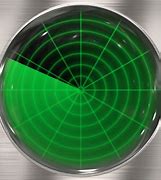
For the calculations, the position of a ship is represented by an (x, y) coordinate pair. The y-axis is parallel to the own ship’s direction of travel and is positive ahead of the ship. The x-axis is perpendicular to it and is positive to starboard—that is, to the right when looking forward. The own ship is located at the origin.
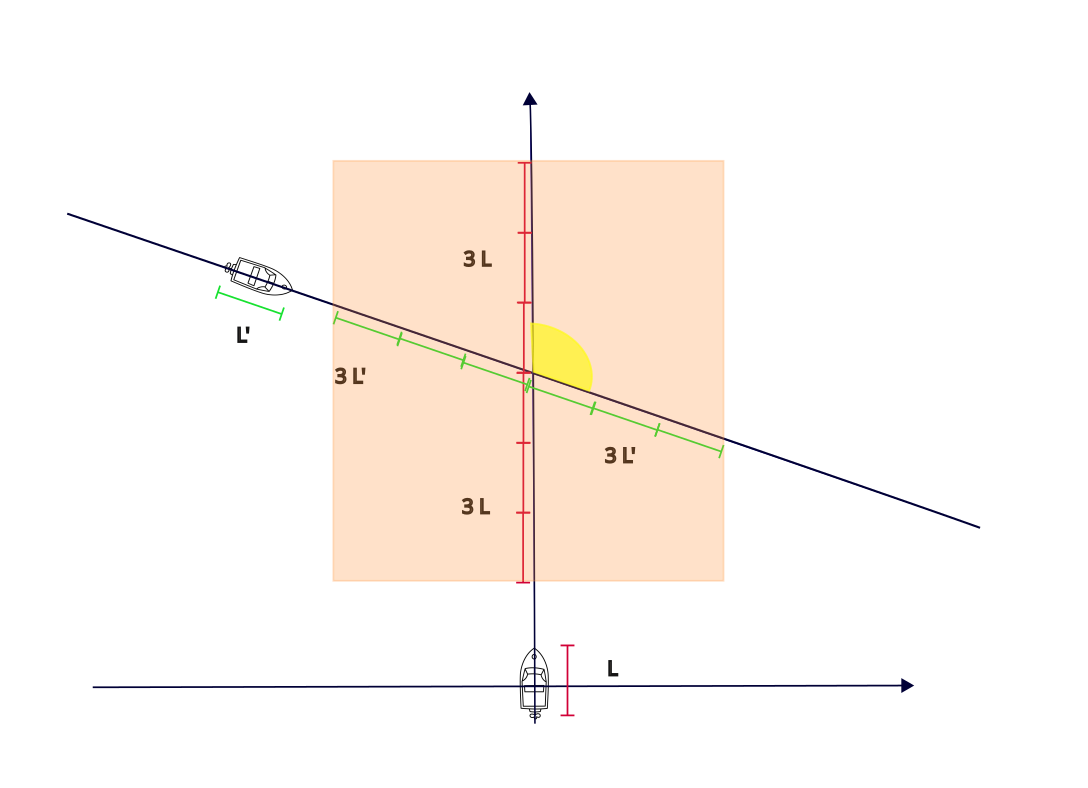
The relative course of the other ship is given in degrees as a value from 0 to 359:
0°: parallel to the own ship and travelling in the same direction;90°: perpendicular to the own ship and travelling from left to right;180°: parallel to the own ship but travelling in the opposite direction;270°: perpendicular to the own ship and travelling from right to left.
In the figure above, the area marked in yellow illustrates the angle representing the relative course.
The input is not the polar bearing of the other ship
The angle supplied by the task is the other ship’s relative course, measured with respect to the own ship’s direction of travel. It is not the polar bearing of the other ship’s position and is not measured from the x-axis.
From these data, the system calculates the intersection of the two ships’ projected paths. In the figure, the required point is where the other ship’s projected path intersects the y-axis.
Using the own ship’s speed and length, the system calculates the time interval during which it will occupy the intersection area, including a safety margin of three ship lengths before and after the ship. More precisely, the interval begins when the bow approaches to within three ship lengths of the intersection and ends when the stern has passed at least three ship lengths beyond it. The geometric centre of the ship is used as its reference point.
The system also receives continuously transmitted speed and length data for the other ship and performs the same calculation for it. If the two ships occupy the danger zone—the orange area in the figure—during disjoint time intervals, no warning is required.
If the two intervals overlap, there is a period during which both ships would occupy the danger zone. The simplified exercise model then applies the following rules:
- If the ships’ courses differ by no more than 90 degrees—that is, they travel at most perpendicularly and not even partly towards one another—the system either recommends that the give-way ship reduce speed or issues a caution. In this exercise, the ship approaching from the right has priority.
- If the ships travel even partly towards one another, the system recommends an avoidance manoeuvre or issues a caution. In this exercise, the lighter ship is treated as more manoeuvrable. The ships also continuously transmit their mass data.
Simplified educational model
These priority and manoeuvring rules are fictional simplifications created for a software-testing exercise. They must not be interpreted as the International Regulations for Preventing Collisions at Sea (COLREGs) and must not be used for real navigation or collision avoidance. The assumed data broadcasts are also part of the exercise model.
The exercise assumes that the broadcasting systems are not fully standardized. Different ships may therefore transmit speed, length, and mass values in different units:
- Length:
cm,m(100 cm),km(1000 m),in(2.54 cm),ft(12 in),yd(3 ft),mi(1760 yd),nm(1852 m) - Mass:
g,kg(1000 g),t(1000 kg),oz(28.34952 g),lb(16 oz) - Time:
s,m(60 s),h(60 m) - Speed:
m/s,km/h,mi/h,knot(1 nm/h)
Unit symbols
In this project, m denotes minutes in a Time value and metres in a Length value. The class supplies the context, but tests should verify that this overloading is handled correctly. The statute-mile symbol is consistently written as mi.
Unit tests:
- Download the Eclipse project and extract it.
- Import the project into Eclipse using either of the following commands, as appropriate:
File → Open Projects from File System…File → Import… → General → Existing Projects into Workspace- Right-click the
Shipproject and selectNew → Source Folder. Entertestas the folder name. - Right-click the
testfolder and selectNew → Package. Enterscwsas the package name. - Right-click the package and select
New → JUnit Test Case. - Select New JUnit Jupiter test.
- Enter
UnitTests.javaas the name. - Under Which method stubs would you like to create?, select all four options.
- Add the following tests to the project.
Correct unit test for the Time.as method
1 2 3 4 5 6 | |
Deliberately failing unit test for the Time.as method
1 2 3 4 5 6 | |
- Right-click the
Shipproject and selectRun As → JUnit Test. - Observe that one test passes and one test fails.
Create unit tests with JUnit for the unit-conversion classes. Include normal cases, boundary cases, conversions in both directions, invalid units, and comparisons where applicable.
What is the result of running the tests?
Did the tests reveal any defects? Document the failing test, the expected result, and the actual result.
Defect revealed by unit testing
The int compareTo(T) method of the AbstractUnit class is defective.
Integration test:
- Right-click the package and select
New → JUnit Test Case. - Select New JUnit Jupiter test.
- Enter
IntegrationTests.javaas the name. - Under Which method stubs would you like to create?, select all four options.
- Add the following test and run it as described above.
Correct integration test for length, time, and speed
1 2 3 4 5 6 7 8 9 10 11 12 13 14 15 | |
Create integration tests with JUnit. Test interactions among the length, time, speed, mass, and collision-warning components. Include conversions between different units.
What is the result of running the tests?
Did the tests reveal any defects? Document the failing test, the expected result, and the actual result.
Defects revealed by integration testing
- The method of the
Lengthclass that calculates time from distance and speed works incorrectly. - The
ShipCollisionWarningSystemclass interprets the concepts of “before” and “after” incorrectly.
The Algorithm:
The simplified algorithm uses the following notation:
- Own ship: speed
V, lengthL, massM, relative course0°, and relative position(0, 0). - Other ship: speed
v, lengthl, massm, relative courserd, and relative position(dx, dy)in the own ship’s coordinate system.
1. Determine whether the projected paths can cross:
Use the other ship’s relative course and position to determine whether it can cross the own ship’s path:
- If
dx > 0and0° ≤ rd ≤ 180°, the other ship is on the right and is not moving towards the y-axis. - If
dx < 0and180° ≤ rd < 360°, the other ship is on the left and is not moving towards the y-axis. - In either case, there is no future crossing and no warning is issued.
The boundary cases dx = 0 or vx = 0 require separate handling. If vx = 0 and dx ≠ 0, the paths are parallel and do not intersect. If dx = 0, the other ship is already on the own ship’s path; the general division by vx must not be used blindly.
2. Calculate the path intersection:
Resolve the other ship’s speed v into the components vx, perpendicular to the own ship’s path, and vy, parallel to it:
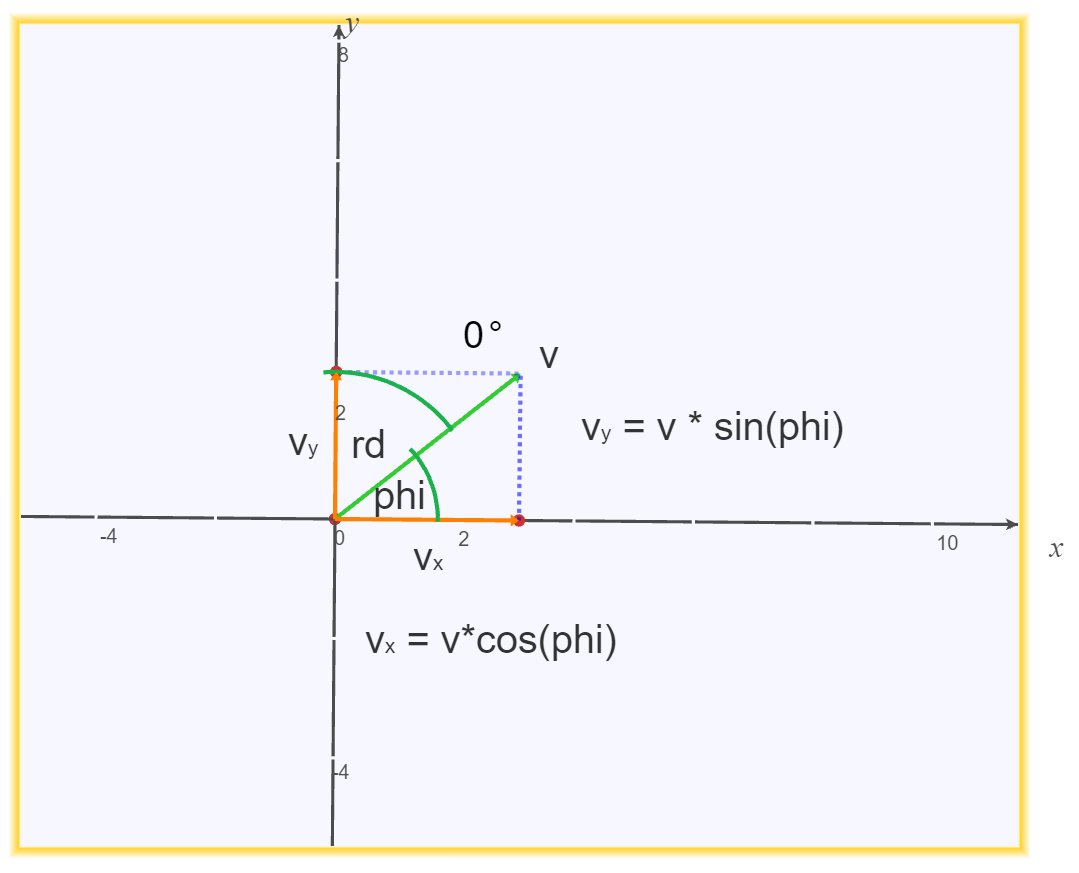
The first component of a vector equals its magnitude multiplied by the cosine of the angle measured from the positive x-axis. However, the relative course rd is measured from the positive y-axis. Therefore, with φ = 90° − rd:
vx = v · cos(90° − rd) = v · sin(rd)vy = v · sin(90° − rd) = v · cos(rd)
If the other ship travels partly towards us, the angle φ may be negative, as illustrated below:
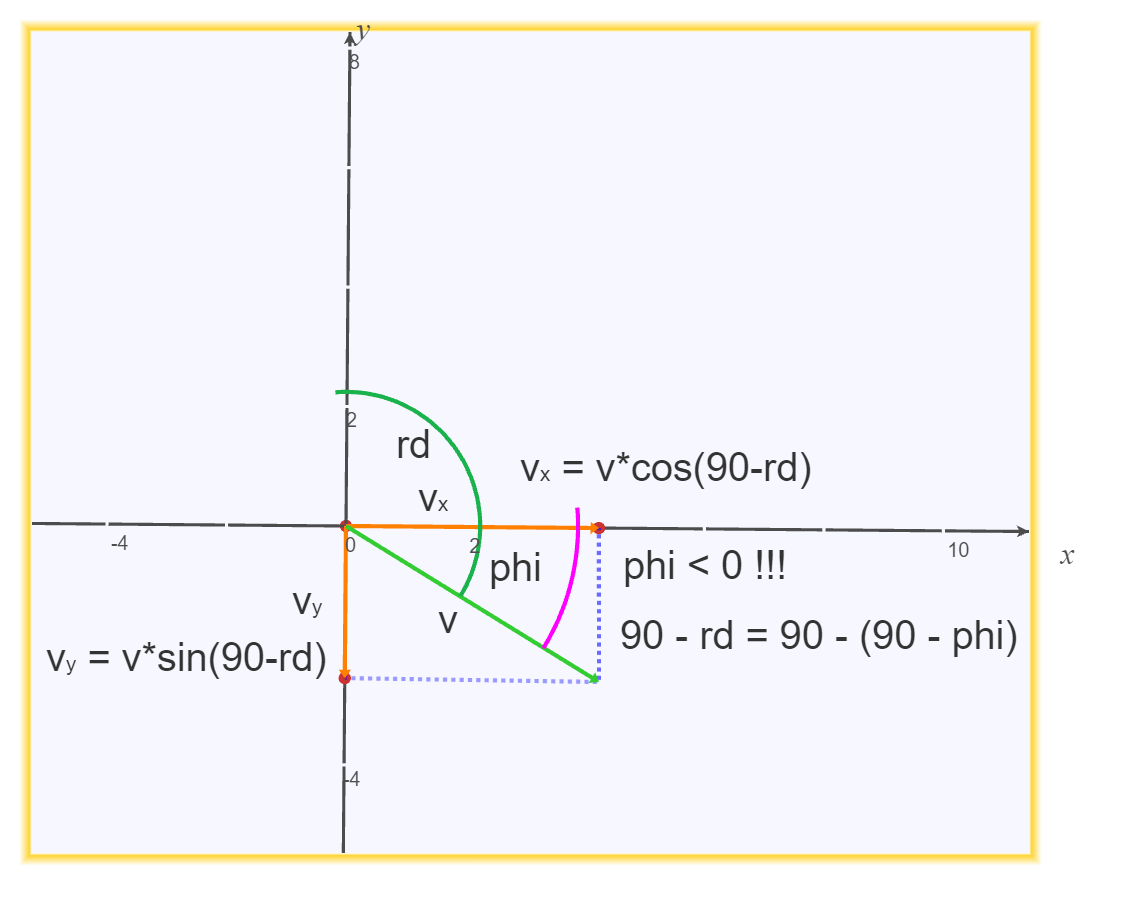
The same formula φ = 90° − rd and the same component equations remain valid in every quadrant. Trigonometric functions in most programming languages expect radians, so degrees must be converted before calling them.
Provided that vx ≠ 0, the time at which the other ship reaches the y-axis is:
t = −dx / vx
A negative value of t means that the crossing occurred in the past. The projected intersection is relevant as a future crossing only when t ≥ 0.
At that time, the other ship crosses the y-axis at:
Y = dy + vy · t
Thus, the intersection point is (0, Y), because the own ship travels along the y-axis by definition.
3. Calculate when each ship reaches the intersection:
- The centre of the other ship reaches the intersection after time
t. - The centre of the own ship reaches it after
T = Y / V, provided thatV > 0.
If T < 0, the own ship has already passed the projected intersection. Zero speeds and other degenerate cases must be handled explicitly to avoid division by zero.
4. Determine whether the danger-zone intervals overlap:
For the other ship, the safety interval extends by three ship lengths beyond both ends of the ship. Measured from its geometric centre, the corresponding time margin is:
dt = 3.5 · l / v
The other ship therefore occupies its danger interval during [t − dt, t + dt].
Similarly, for the own ship:
dT = 3.5 · L / V- danger interval:
[T − dT, T + dT]
The closed intervals overlap exactly when:
max(t − dt, T − dT) ≤ min(t + dt, T + dT)
If this condition is false, no warning is issued. An implementation intended to consider only future danger should intersect both intervals with [0, +∞) before making the decision.
5. Decide which ship should manoeuvre in the exercise model:
If 270° ≤ rd < 360° or 0° ≤ rd ≤ 90°:
- If
dx > 0, the other ship proceeds and the own ship slows down. - If
dx < 0, the own ship proceeds with caution and the other ship slows down.
If 90° < rd < 270°:
- If
m > M, the other ship proceeds with caution and the own ship manoeuvres. - If
M > m, the own ship proceeds with caution and the other ship manoeuvres.
The equality cases (dx = 0, m = M, and the angular boundaries) must be specified and tested rather than left to accidental implementation behavior.
Create system-level tests with JUnit. Derive the test cases from the specification above.
- ships approaching from both the left and the right;
- all four cardinal relative courses (
0°,90°,180°, and270°); - angular and positional boundary values;
- paths that do not cross, cross in the past, and cross in the future;
- danger intervals that are disjoint, touch at one endpoint, and overlap;
- equal and unequal ship masses;
- mixed measurement units;
- zero or invalid values and unsupported units;
- the special cases
dx = 0andvx = 0.
What is the result of running the tests?
Did the tests reveal any defects? For each failure, record the input, expected result, actual result, and relevant diagnostic information.
Defect revealed by system testing
If the other ship approaches head-on, the system may issue a warning even when the lateral separation is safe.
The solution must be submitted as an essay by email to the practice instructor. It must include the modified JUnit tests—the complete source code—a description and justification of each test, and precise answers to all questions posed in the exercise.