Test Automation
Test automation uses software to execute tests, compare actual and expected results, prepare test data or environments, and produce reports. It is most valuable for repeatable checks that must be run frequently and consistently.
Automation does not eliminate human testing work. People are still needed to define the test objective and oracle, select appropriate cases, investigate failures, maintain the automation, and perform forms of testing that depend on exploration or human judgement.
Typical objectives:
- repeatable and consistent execution;
- rapid feedback about changes;
- regression detection;
- execution across several configurations or datasets;
- collection of evidence, logs, and coverage data;
- reduction of repetitive manual work.
Regression testing
Regression testing checks whether a change has adversely affected previously working behaviour. Regression tests may be manual or automated, although frequently repeated regression checks are often good candidates for automation.
Automation does not mean:
- replacing all manual and exploratory testing;
- automating every available test case;
- eliminating test maintenance;
- guaranteeing lower cost or better quality.
Automation has an initial and continuing cost. Its value depends on execution frequency, maintenance effort, defect risk, and the useful lifetime of the automated check.
Selecting Tests for Automation
Typical good candidates:
- stable and frequently used functionality;
- regression tests;
- API and service-level checks;
- data-driven tests;
- tests that must run with many inputs or configurations;
- repetitive setup and verification tasks;
- checks required in every build or release.
Candidates requiring careful evaluation:
- rapidly changing user interfaces;
- one-time checks;
- tests with unstable external dependencies;
- subjective usability or aesthetic evaluation;
- exploratory testing.
Some parts of these activities can still be automated. For example, visual-regression tools can detect pixel or layout differences, while a person decides whether the change is acceptable. Automation can also prepare data, navigate to a starting state, and collect evidence for exploratory testing.
A useful selection question
Do not ask only whether a test can be automated. Ask whether automating it provides sufficient value compared with its implementation and maintenance costs.
Test Levels, Types, and Approaches
These classifications describe different dimensions and should not be treated as mutually exclusive.
- Test levels: unit, component, integration, system, and acceptance testing.
- Functional testing: checks behaviour against functional requirements.
- Non-functional testing: may examine performance, load, reliability, security, accessibility, or usability.
- White-box testing: derives tests from knowledge of the internal structure.
- Black-box testing: derives tests from externally observable behaviour and specifications.
- Grey-box testing: uses partial knowledge of the internal structure.
An API test, for example, may be an integration-level functional test designed with black-box techniques.
Test Automation Pyramid
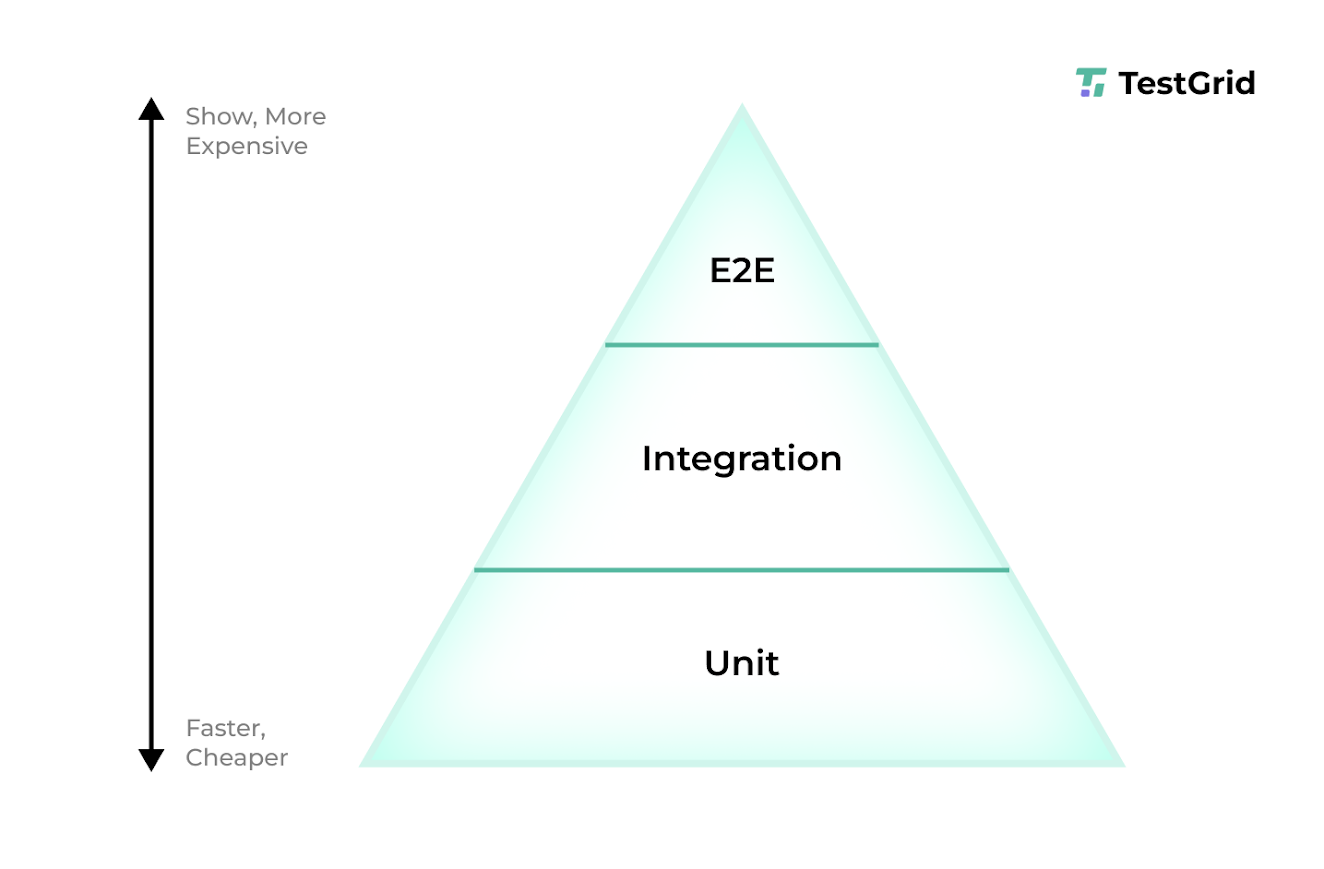
The test automation pyramid is a heuristic that recommends:
- many fast, focused tests at lower levels;
- fewer service or integration tests;
- a smaller number of broad and comparatively slow E2E tests.
It is not a mandatory numerical ratio. The appropriate balance depends on system architecture, risk, testability, and the cost and diagnostic value of each layer.
Layers of the Automation Toolchain
| Layer | Purpose | Examples |
|---|---|---|
| Test framework | Defines tests, assertions, fixtures, and lifecycle hooks | JUnit, pytest, NUnit, Jest, Mocha, PHPUnit |
| Test runner | Discovers and executes tests and reports their results | pytest, Maven Surefire, Jest, NUnit runner |
| UI automation | Controls a browser or graphical interface | Selenium, Cypress, Playwright |
| API testing | Sends requests and validates responses | REST Assured, Karate, Postman and Newman |
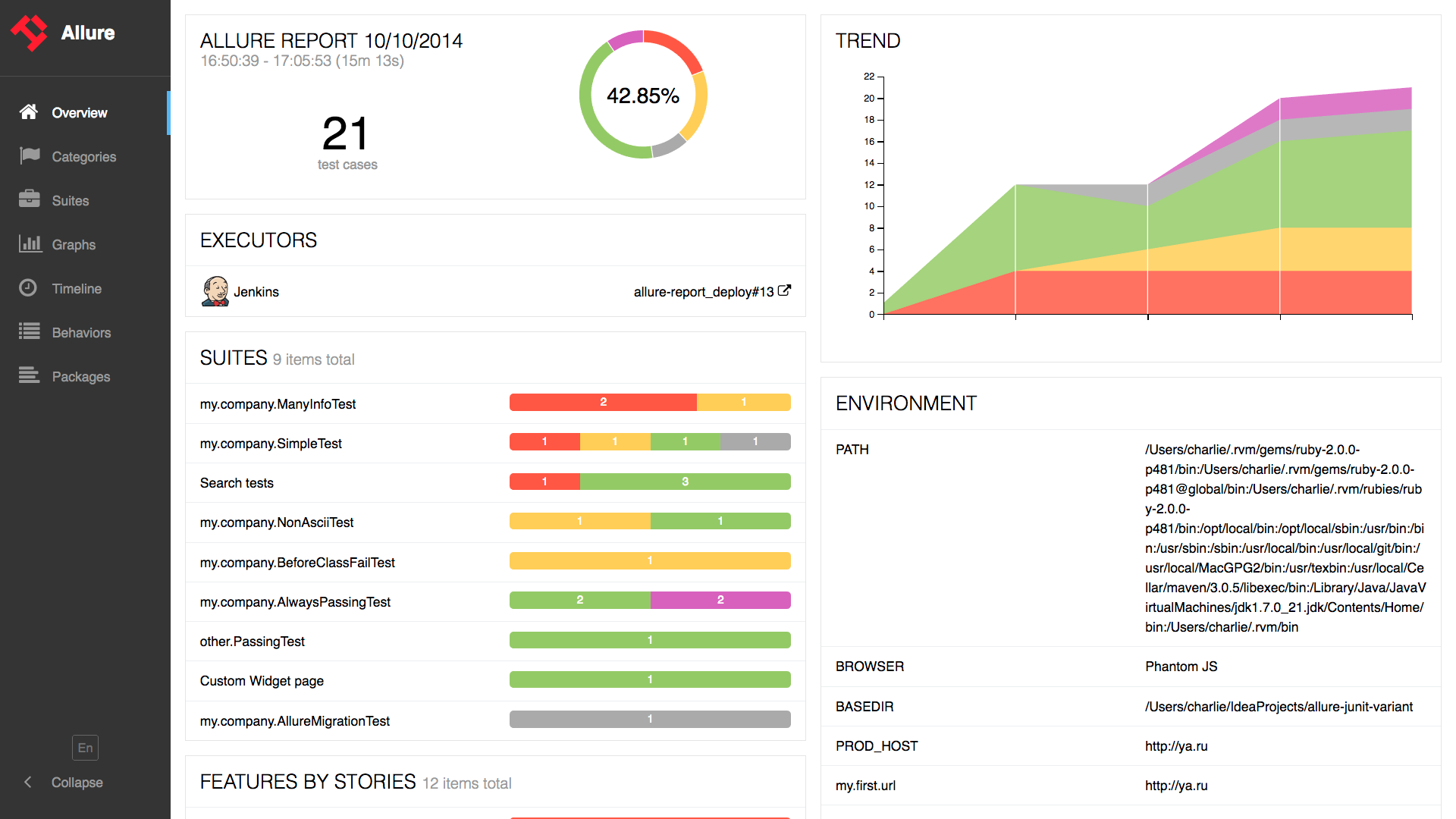
| Reporting | Aggregates and presents test results | Allure, built-in HTML or XML reports |
| CI/CD orchestration | Starts builds and tests in controlled environments | GitHub Actions, GitLab CI/CD, Jenkins |
The boundaries are not strict: a single product may provide several of these functions.
Automation Patterns and Methodologies
Page Object Model
The Page Object Model (POM) separates UI-specific locators and operations from test intent. A page or reusable interface component is represented by an object that exposes meaningful actions to tests.
Typical benefits include:
- reduced duplication of locators;
- clearer tests;
- localized maintenance after UI changes;
- reusable page-level operations.
Page objects should normally model interface services rather than contain complete business scenarios. Assertions about test outcomes usually remain in the tests, except for checks that verify whether the page object loaded correctly.
Data-Driven Testing
Data-driven testing executes the same test logic with multiple datasets. Test data may come from parameters, CSV or JSON files, spreadsheets, databases, or generated values.
Each dataset should be identifiable in reports, and shared test data must not create hidden dependencies between tests.
Behaviour-Driven Development
Behaviour-Driven Development (BDD) is a collaborative approach for discovering and specifying behaviour through concrete examples. Gherkin can express those examples in an executable Given–When–Then form:
1 2 3 | |
Common tools include:
Gherkin syntax alone does not constitute BDD. The important part is the collaboration used to discover examples and clarify expected behaviour.
Test Automation Process
- Define the test objective and expected result.
- Select valuable and maintainable cases for automation.
- Choose tools that fit the system and team.
- Design reusable fixtures, interfaces, and test-data handling.
- Implement and review the automated tests.
- Execute the tests in a controlled environment.
- Integrate appropriate suites into CI/CD.
- Report results and preserve diagnostic evidence.
- Investigate failures and maintain or remove obsolete tests.
Example API Test
The following pytest example assumes that BASE_URL points to a controlled test environment:
1 2 3 4 5 6 7 8 9 10 11 12 13 14 15 16 17 18 19 20 | |
The status code and response schema are the test oracle and must be derived from the API contract. Tests should not depend on uncontrolled production data.
Example UI Test
The following Java example illustrates a Selenium test. It assumes that the configured test environment provides the stated elements and page title:
1 2 3 4 5 6 7 8 9 10 11 12 13 14 | |
Credentials and other secrets must come from protected test configuration rather than source code.
CI/CD Integration
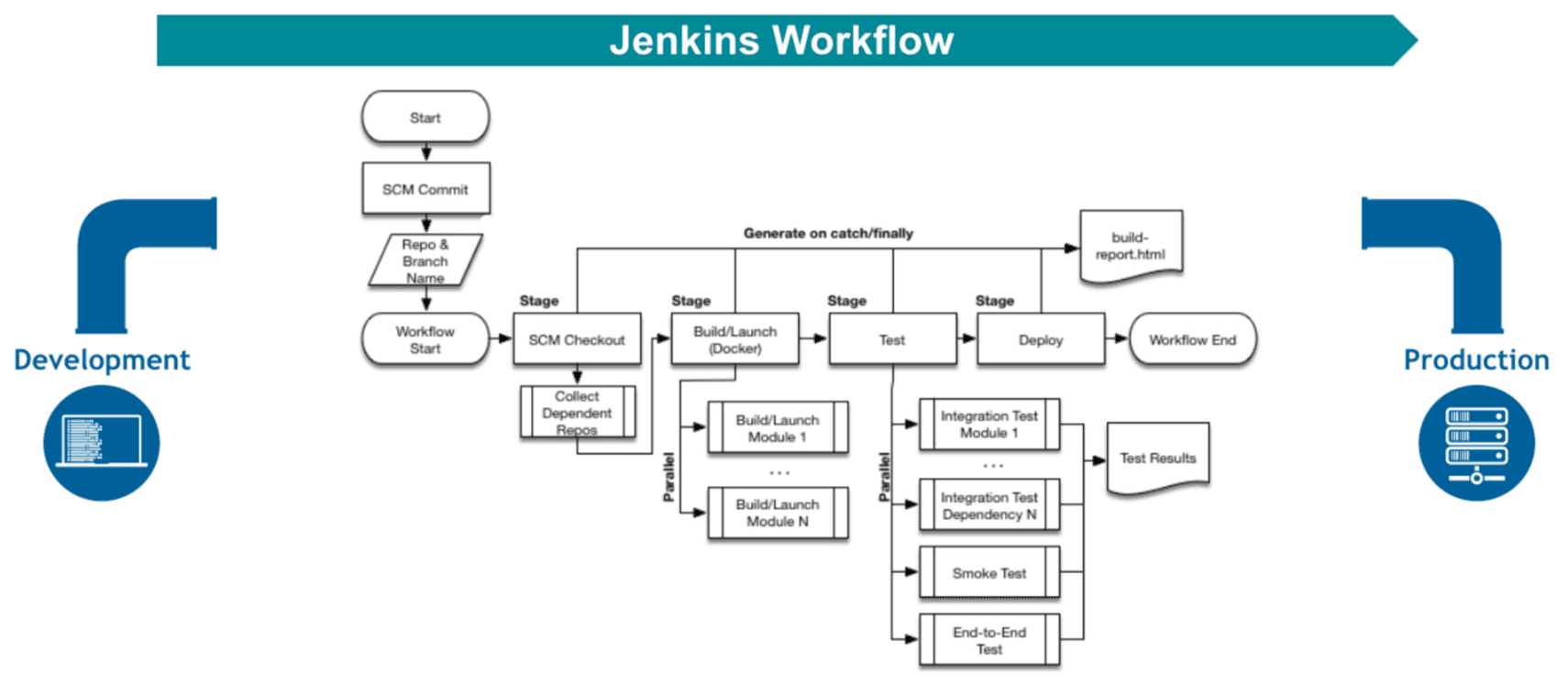
A typical pipeline may perform the following sequence:
- build the application;
- run fast unit and component tests;
- perform static analysis;
- deploy to an isolated test environment;
- run integration and API tests;
- run selected E2E tests;
- collect reports and diagnostic artefacts;
- apply explicitly defined quality gates.
Not every test should necessarily run on every commit. Fast checks may run immediately, while slower suites can run before merging, on a schedule, or before release.
Example report:
Useful Metrics
Metrics must be interpreted in context; no single metric demonstrates test quality.
- execution duration and feedback time;
- pass, fail, error, and skipped counts;
- requirements or risk coverage;
- code coverage, where relevant;
- defect detection and escaped-defect trends;
- flaky-test rate;
- test maintenance effort;
- time required to diagnose failures.
What is a flaky test?
A flaky test produces different outcomes without a relevant change in the software under test. Common causes include shared state, timing assumptions, uncontrolled data, concurrency, network dependencies, and inadequate environment isolation.
A flaky test represents an automation defect or an uncontrolled dependency. Re-running it can support diagnosis but should not be used to conceal the problem.
Common Automation Mistakes
- relying on too many slow E2E tests;
- using unstable locators or timing-based waits;
- duplicating test logic and data;
- sharing mutable state between tests;
- writing assertions that do not verify the intended behaviour;
- ignoring flaky tests;
- coupling tests unnecessarily to implementation details;
- keeping obsolete or low-value tests indefinitely;
- exposing credentials or production data in test code;
- treating a green automated suite as proof that the system is defect-free.
Practical Applications
Swagger and OpenAPI
The material related to Swagger and OpenAPI is available here.
Playwright
The material related to Playwright is available here.
Selenium
The material related to Selenium is available here.