Other Testing Techniques
Black-box and white-box techniques are complemented by approaches that derive tests from collaboration, tester experience, behavioural models, generated data, search, or interaction with the system. Artificial intelligence does not replace these foundations; it can help apply them at greater scale and can introduce adaptive or agent-based exploration.
Collaboration-Based Testing
The goal of collaboration-based testing is to ensure that different roles work in a coordinated way, using shared communication to prevent defects and build a common understanding of how the product works.
- Testing is the responsibility of the entire team.
- Testers actively participate in clarifying requirements.
- Early involvement (Shift Left) reduces defect costs.
Three Amigos

The three perspectives:
- Business – what should the system do?
- Development – how can it be implemented technically?
- Testing – how can it be verified? what are the risks?
Testers take part in preventing defects, not only detecting them.
Acceptance criteria clarification
Test design and requirement interpretation should start from examples and concrete test inputs.
The three elements:
- Rule – business logic.
- Example – testable situations.
- Question – requirements that need clarification.
Attributes of a “good requirement” and “testability”:
- unambiguous,
- verifiable,
- consistent.
Examples help achieve these.
Three Amigos
Function: "Password reset via email."
-
Business perspective
-
“The user should receive a reset link valid for 1 hour.”
-
“The link should be single-use.”
-
Developer perspective
-
“The token will be a 64-character random string.”
-
“After activation, the token status changes to ‘used’.”
-
Tester perspective
-
What kinds of defects may occur?
- Token expiration: “What happens after 61 minutes?”
- Token reuse: “Should a second attempt show an error?”
- Invalid token: “How does the system respond to a manipulated link?”
Testability:
- Event logging (audit)?
- Consistent error messages?
Result:
- Refined requirements
- Clarified business rules
- Newly identified edge cases
- Ensured testability
Acceptance criteria clarification
Function: "The system shall lock the user after three failed login attempts."
Rules:
- If the user enters an incorrect password 3 times, the account is locked.
- The lock lasts 30 minutes.
- During the lock the user cannot attempt login again.
Examples:
- E1: 1 failed attempt → No lock needed.
- E2: 3 consecutive failed attempts → account locked.
- E3: 3 failed attempts from 2 different devices → lock must still occur.
- E4: 4th attempt during lock → system informs the user that the account is locked.
Questions:
- After how long does the counter reset if fewer than 3 attempts occurred?
- Does the lock duration restart if the user requests a new login?
- Is the 30-minute lock configurable?
- Should the IP addresses of failed attempts be logged?
Result:
- The requirement becomes genuinely testable and consistent.
- The examples can later serve as the foundation for BDD scenarios.
- The questions reveal hidden risks.
Specification by Example and BDD
- BDD helps ensure testability.
- The Given–When–Then format serves as the basis of test cases.
- Scenarios create a “common language” between roles.
1 2 3 | |
During collaboration, the tester:
- identifies potential boundary values (Boundary testing),
- highlights possible equivalence classes,
- raises potential risks, see Risk-based testing.
Experience-Based Techniques
These techniques are useful when
- requirements are incomplete,
- time is limited,
- fast defect discovery is needed,
- uncertainty is high,
- there is no detailed test documentation.
These methods rely on the tester’s expertise and intuition.
Error Guessing
Error guessing is a method based on the tester’s professional experience and assumed defect patterns.
Typical defect patterns:
- Handling of null values
- Mismatched formats
- Incorrect boundary handling
- Incorrect state transitions
- Poorly handled exceptions
Error guessing
“What happens if the user’s password is 0 characters long?”
Exploratory Testing
Exploratory testing is:
- simultaneous design, execution, and learning,
- structured but not script-based,
- goal-driven (charter),
- session-based (SBTM)
Key elements:
- Charter: short mission (e.g. “Test the payment flow with extreme data inputs”).
- Observation and adaptation.
- Notes (notes, findings).
Charter
“Investigate what input validations the system performs during registration.”
Using Checklists
This is one of the most important experience-based methods:
- more structured than exploratory testing,
- fast and time-efficient,
- captures standards or organizational know-how.
Example checklist items:
- Does each mandatory field have validation?
- Are messages clear and consistently displayed?
- Is error logging adequate?
- Can the operation be reset to default state?
Heuristics
Heuristics are cognitive patterns derived from experience.
Examples:
- Consistency oracle — looking for consistency
- State-based thinking — defects around state transitions
- Claims testing — does the system actually do what it claims?
- History-based heuristics — assumptions based on past defects
Generative and Search-Based Techniques
Model-Based Testing
Model-based testing derives tests from an explicit model of the system, such as a state machine, decision table, or workflow. A generator can select paths and create tests that cover states and transitions. An LLM may help build a candidate model from requirements, but the model must be checked because an omitted or invented transition affects every generated test.
Property-Based Testing
Property-based testing generates many inputs and checks general properties rather than only individual examples. For example, a sorting function should preserve the number of elements and return them in non-decreasing order. Frameworks such as Hypothesis and QuickCheck generate inputs and shrink a failing input to a smaller counterexample.
Fuzz Testing
Fuzz testing supplies malformed, unexpected, or randomly mutated inputs to reveal crashes, hangs, memory errors, and validation defects. Coverage-guided fuzzers use execution feedback to favour inputs that reach new program paths. An LLM can propose structured seeds or domain-specific input grammars, but the fuzzer and its runtime oracle detect the actual failure.
AI-Assisted Testing
Why do we use artificial intelligence in testing?
AI can help analyse large specifications and codebases, propose unusual inputs, generate test artefacts, and guide exploration through large state spaces. Its output must still be verified against the specification and actual system behaviour.
Advantages of AI:
- discovering new edge cases (mapping the input space),
- automatic generation of UI and API tests,
- code- or specification-based testing,
- analysis and maintenance of regression tests,
- goal-directed UI or API exploration.
LLM-based Test Case Generation
LLMs (e.g., ChatGPT-like models) are capable of:
- writing unit test skeletons or complete tests,
- generating API tests from specifications,
- suggesting boundary cases,
- proposing ideas for invalid inputs.
Exercise: Using an LLM to generate test cases
Let’s explore what different LLMs can do for test case generation using the ATM machine example:
Consider an ATM system function where, if the user enters an invalid PIN three times, the account will be locked. If the PIN is correct on any attempt, the system grants access at that attempt. On the first and second attempts, if the PIN is incorrect, the user receives a warning.
Search-Based Software Testing (SBST)
It works with evolutionary algorithms:
- it mutates and selects test cases,
- goal: maximize code coverage.
Tools:
Agent-Based and Random Exploratory UI Testing
What is reinforcement learning?
Reinforcement learning (RL) is a machine-learning paradigm in which an agent improves a decision policy through interactions and rewards. A test agent may reward new states, new coverage, or failures. Merely assigning scores to random actions is not reinforcement learning unless those scores affect later action selection.
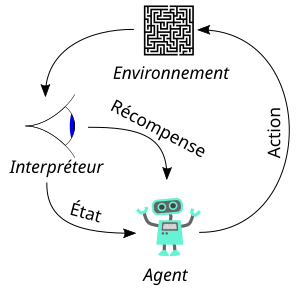
An exploratory UI agent may navigate:
- clicking through UI elements,
- mobile interfaces,
- games and 3D environments.
Exercise: Exploring a Web Application UI
The following demo intentionally uses random actions and a reward-like score. It demonstrates the environment and observation loop from which an RL solution could be developed, but it does not learn a policy.
Create a Python virtual environment:
1 | |
Activate this environment:
1 | |
Install Playwright:
1 | |
Install the browsers:
1 | |
This installs the Chromium / WebKit / Firefox drivers into the venv.
Install pytest:
1 | |
Install Flask:
1 | |
Flask works well as a lightweight application server in development environments.
Create the following demo_app.py file:
1 2 3 4 5 6 7 8 9 10 11 12 13 14 15 16 17 18 19 20 21 22 23 24 25 26 27 28 29 30 31 32 33 34 35 36 37 38 39 40 41 42 43 44 45 46 47 48 49 50 51 52 53 54 55 56 57 58 59 60 61 62 63 64 65 66 67 68 | |
This application provides a small menu, a form, and an intentionally 500-error page — ideal for RL-style exploration.
Create the following test_rl_explorer.py script:
1 2 3 4 5 6 7 8 9 10 11 12 13 14 15 16 17 18 19 20 21 22 23 24 25 26 27 28 29 30 31 32 33 34 35 36 37 38 39 40 41 42 43 44 45 46 47 48 49 50 51 52 53 54 55 56 57 58 59 60 61 62 63 64 65 66 67 68 69 70 71 72 73 74 75 76 77 78 79 80 | |
Run the application:
1 | |
Run the test:
1 | |
Browser Agents
What is this?
Browser Use is an example of a tool that controls a browser through an AI agent. The agent navigates like a human:
- clicks,
- fills fields,
- follows page logic,
- attempts to accomplish the given task.
Why is it relevant in testing?
- automatic generation of UI tests
- interaction based on visible page content and a stated goal;
- discovery of rarely visited paths
- quick regression testing
Usage of the tool
1 2 3 4 5 6 7 | |
Runtime environment
To run the above code, you need an API key (available by registering at the link), and you must install the browser_use_sdk package: pip install browser_use_sdk
Exercise: Fake Browser Client
If you prefer not to use an API key, try the following example:
1 2 3 4 5 6 7 8 9 10 11 12 13 14 | |
Testing AI-Based Systems
AI-based systems introduce additional testing problems because their outputs may be probabilistic and a single exact expected result may not exist.
Useful techniques include:
- Metamorphic testing: check relations between multiple executions. For example, a small irrelevant formatting change should not reverse a sentiment classification.
- Differential testing: compare different models, versions, prompts, or implementations on the same input and investigate significant disagreements.
- Robustness testing: apply noise, paraphrases, missing values, unusual formats, or adversarial inputs and measure how much the result changes.
- Data testing: examine training and evaluation data for missing values, duplicates, leakage, imbalance, and unrepresented groups.
- Statistical testing: repeat tests and evaluate distributions, error rates, confidence intervals, and thresholds instead of relying on one execution.
- Human evaluation: use defined criteria and multiple evaluators when correctness cannot be determined automatically.
The oracle problem
For generative AI, a plausible answer is not necessarily correct, and several different answers may all be acceptable. Test criteria should therefore address factuality, relevance, safety, consistency, and task-specific constraints rather than requiring one exact sentence.
What Problems Can Arise During AI-Assisted Testing?
| Risk | Typical consequence | Control |
|---|---|---|
| Hallucination | Non-existent APIs, rules, or expected results appear in tests | Ground generation in approved specifications and review every assertion |
| Poor explainability | The purpose or path of a generated test cannot be reconstructed | Record the test objective, inputs, oracle, and relevant coverage |
| Concept drift | Tests follow an obsolete UI, API, rule, or data distribution | Detect changes and periodically review or regenerate affected tests |
| UI instability | Dynamic elements, timing, or overlays cause flaky actions | Use stable locators, explicit synchronization, and reproducible traces |
| Suite degradation | Generated tests become duplicated, undocumented, or difficult to maintain | Apply ownership, review, deduplication, and deletion rules |
| Excessive generation | Unrealistic cases slow down the pipeline without useful evidence | Constrain the input model and prioritize cases by risk |
| Excessive permissions | An agent exposes data or modifies the environment | Isolate execution and grant only the minimum required access |
Human responsibility
AI-generated tests and findings are proposals. A responsible person must approve the oracle and expected result, verify traceability to requirements, and decide whether the evidence is sufficient—especially in regulated or safety-critical systems.
Supplementary Material: A/B Testing and AI
A/B testing is controlled experimentation rather than a defect-detection technique. It compares alternatives using an observable outcome, such as task completion, error rate, or response time.
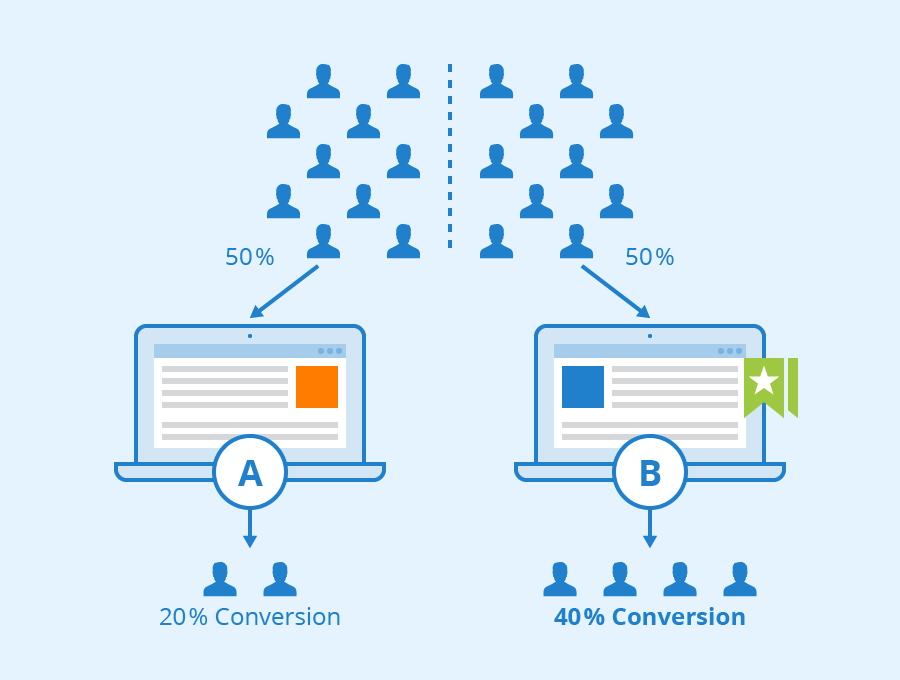
Users are randomly assigned to a control version and one or more variants. LLMs can propose variants and help summarize experiment results, while statistical methods must determine whether an observed difference is credible.
A multi-armed bandit differs from a classical fixed-allocation A/B test: it adapts traffic allocation as observations accumulate. This can reduce exposure to weaker variants, but it complicates statistical interpretation and may react incorrectly to drift, seasonality, or biased feedback.
Experimentation risks
Automatically generating and selecting many variants can encourage false discoveries and black-box optimization. Variants, outcome measures, stopping rules, and decision criteria should be defined and recorded before results are interpreted.
Excercise
Examining the Calculator Project
Examine the code in the Calculator project inside the workspace.zip.
Run EvoSuite on the project to automatically generate test cases for the classes.
Focus on at least the classes Calculator and CSzam.
After running EvoSuite, open the generated report and examine the reported coverage values for each class.
- What coverage values were produced by EvoSuite for the different classes?
- Why does EvoSuite generate tests successfully for some classes, such as
CSzam, but not for others, such asSzamologep?
Next, modify EvoSuite’s configuration and run it again.
- What happens when you change EvoSuite’s settings?
- Do the coverage values, test cases, or reported goals change when you adjust the parameters?